Got a question about the 360 tools? |
|
|
Q1. Where can I get my promo codes for the Basic360 and Advanced360 Profiles?
A. Promo codes can be found in the book “A FAMILY BUSINESS ON THE MOON: 24 activities to plan your family and business future” Q2. How many times can I use each promo code? A. Each promo code can only be used once and is subject to expiration. Q3. When does the promo code in the book expire? A. The expiration date is currently set to 6 August 2029, but is subject to change. Q4. What is the current promotion for the Basic360 Profile? A. Your Basic360 promo code found in the book, and starting with ABXXXX will get you 3 respondents per Promo code off the total bill. Q5. Can I combine my Basic360 promo codes? A. Yes, you can combine your Basic360 promo codes. This means that if you buy 3 books, you can get 9 respondents off the total Basic360 with 3 unique promo codes. Q6. What is the current promotion for the Advanced360 Profile? A. Your Advanced360 promo code found in the book, and starting with AAXXXX will get you 20% off the total bill. This applies to an unlimited number of participants. Q7. How do I make payment for the 360 Profiles? A. Payment can be made by credit card, PAYPAL or STRIPE. Q8. How is the price calculated? A. Our pricing is based on the number of participants, (ie. the number of emails submitted), for each survey you create. To encourage more participation for the family, the pricing is also tiered, so that larger the group gets, the better the price per participant. Example: For the Basic360, it's US$29 per participant (pp) for the first 8, then US$25pp for the 9– 15th participants and finally, US$20pp for the 16th participant onwards. So if you had 20 participants, your total bill will be : Participant 1–8: 8 x US$ 29 = US$ 232 Participant 9–15: 7 x US$ 25 = US$ 175 Participant 16–20 5 x US$ 20 = US$ 100 Total bill = US$507 And if you had 3 Basic360 promo codes from 3 books, you will get 3 x 3 participants off the bill: Less 8 x US$29 ( US$232) + 1 x US$25 = US$257 Final bill = US$250 For the Advanced360, it's US$150 per participant for the first 8, then US$125 for the 9– 15th participants and finally, US$100 for the 16th participant onwards. So if you had 20 participants, your total bill will be : Participant 1–8: 8 x US$ 150 = US$ 1,200 Participant 9–15: 7 x US$ 125 = US$ 875 Participant 16–20 5 x US$ 100 = US$ 500 Total bill = US$2,575 And if you had an Advanced360 promo code from the book, you will get 20% off the bill: Less 20% = US$515 Final bill = US$2,060 Q9. How soon will respondents receive an email once they are invited by the main user? A The respondents should typically receive e-mails with their unique link within 10-15 minutes from the time they are invited. Delays in e-mail traffic may occur on the recipient’s end if they have firewalls or spam filters. The email will come from Family and Business Learning <no-reply@fab-learning.com>, with subject header "You are invited to complete the Basic360 (or Advanced360 or Communication360) for [your survey name]" Q10. How can I begin the survey? A If you are the main user/Facilitator, go to MY DASHBOARD/MY SURVEYS/[Survey type] and click Begin Survey If you are a respondent, you will receive an email from Family and Business Learning with subject " “You are invited to complete the {survey type} (eg. Communication360) for {your survey name}” with a link to Begin Survey. Q11. How do I add another email address after I’ve already started the Basic360? A Go to MY DASHBOARD/MY SURVEYS/[Survey type] click Invite Then add the email and submit. You will be directed to make a payment for the additional respondent. Once your payment is successful, your new respondent will receive an email to participate in your survey shortly. Note that you can only add email addresses when the survey is still active (not closed). Q12. How can I amend or change an email address after I’ve already submitted it? A At this time, you will need to write to kay@fab-learning.com to help you with this. Q13. How do I know when the other respondents have completed their surveys? A Go to MY DASHBOARD/MY SURVEYS/[Survey type] and click the Completed/Invited numbers for your survey. You will see a list of all the emails you invited and whether each one has completed or not. Q14. How do I tell how many of the respondents have yet to complete the 360? A Go to MY DASHBOARD/MY SURVEYS/[Survey type] and review the numbers under the Completed/Invited column. Q15. How can I tell who has not yet completed the 360? A Go to MY DASHBOARD/MY SURVEYS/[Survey type] and click the Completed/Invited numbers for your survey. You will see a list of all the emails you invited and whether each one has completed or not. You may click reinvite to send another email to those who have not yet completed their 360. Q16. How can I close the survey before the default 90 days? A Go to MY DASHBOARD/MY SURVEYS/[Survey type]/ CloseSurvey and click CONFIRM. If there are still respondents who have not completed their surveys, you will see this pop up message: “Please note that there are still X of respondents who have not completed the survey. Once you close this survey, you will not be able to reactivate it, and the report will be generated based on the responses received to date.” You can decide to either CANCEL or CONFIRM to proceed with your request to Close the Survey. Q17. How do I generate my 360 feedback report? A Users can go to MY DASHBOARD/MY SURVEYS/[Survey type] and click Analyze to view the report at anytime. If you are a respondent, you can access your report when the survey is closed. You will receive the link to the report in an email to inform you that everyone has completed the 360 and the feedback report is ready. The email will come from Family and Business Learning <no-reply@fab-learning.com> with the subject title " The {survey type} eg. Basic360 or Communication360) report for [your survey name] is now ready for your review" Q18. How can I extend the expiry date? A The default expiry is set at 90 days and you cannot extend it beyond that period. Q19. I didn’t receive any email to start the survey. A If you are the main user, you can start your survey by going to MY DASHBOARD/MY SURVEYS/[Survey type] and click Begin Survey. If you are the respondent, please check your junk or spam folders. If you still can’t find it there after an hour, please contact kay@fab-learning.com Q20. I forgot my password. A Click Forgot Password and enter your email address to receive a link to reset your password. Q21. I would like to delete an email or respondent. A At this time, you will need to contact kay@fab-learning.com for help. Please note that payments made to Family and Business Learning (FAB LEARNING) are, as a general rule, not refundable. However, FAB LEARNING may provide you a refund or other consideration, with the amount and form - and the decision to provide it - at its sole and absolute discretion. Any effectuated refund does not entitle you to further refunds or other considerations in the future for similar instances, nor does it obligate FAB LEARNING to provide them in the future, under any circumstance. Q22. My respondent has not received the email invitation. A Go to MY DASHBOARD/MY SURVEYS/Invite and check if the email address you entered is correct. If it is, you can click reinvite to send the email again. Or ask your respondent to check his spam folder. If he still has not received the email invitation, please contact kay@fab-learning.com Q23. How long does it take to complete the 360? A It should take around 10 - 20 minutes to complete the Basic360 and the 360 Scorecards. Although some may take more time to respond to the open-ended questions. The Advanced360 should take around 30 - 60 mins to complete. Q24. I changed my mind. Can I get a refund? A All payments made to Family and Business Learning (FAB LEARNING) are, as a general rule, not refundable. However, FAB LEARNING may provide you a refund or other consideration, with the amount and form - and the decision to provide it - at its sole and absolute discretion. Any effectuated refund does not entitle you to further refunds or other considerations in the future for similar instances, nor does it obligate FAB LEARNING to provide them in the future, under any circumstance. Please refer to our Terms of Use for more details. |
Price table for 360 Profiles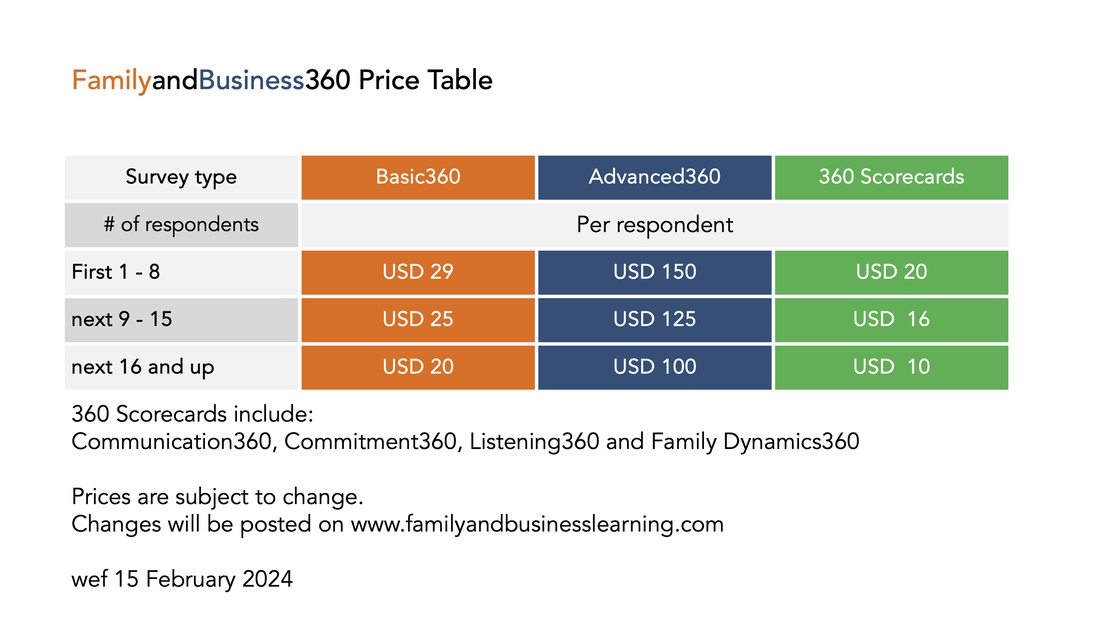
Price table for Family and Business360 tools
If you can't find what you need here, please email us at kay@fab-learning.com
|